Cases Overview
Cases are the core of SAR Portal. Each case represents a single Data Subject Access Request (DSAR) from start to finish.
What is a Case?
A case is created when someone exercises their GDPR rights by requesting access to, deletion of, or correction of their personal data. Each case tracks:
- Subject Information: Name, email, phone of the person making the request
- Request Type: The specific GDPR right being exercised
- Timeline: When received, due date, and all activities
- Documents: Files uploaded and processed for the request
- Communications: Emails sent to the data subject about the case
- Status: Current state in the workflow
Cases List View
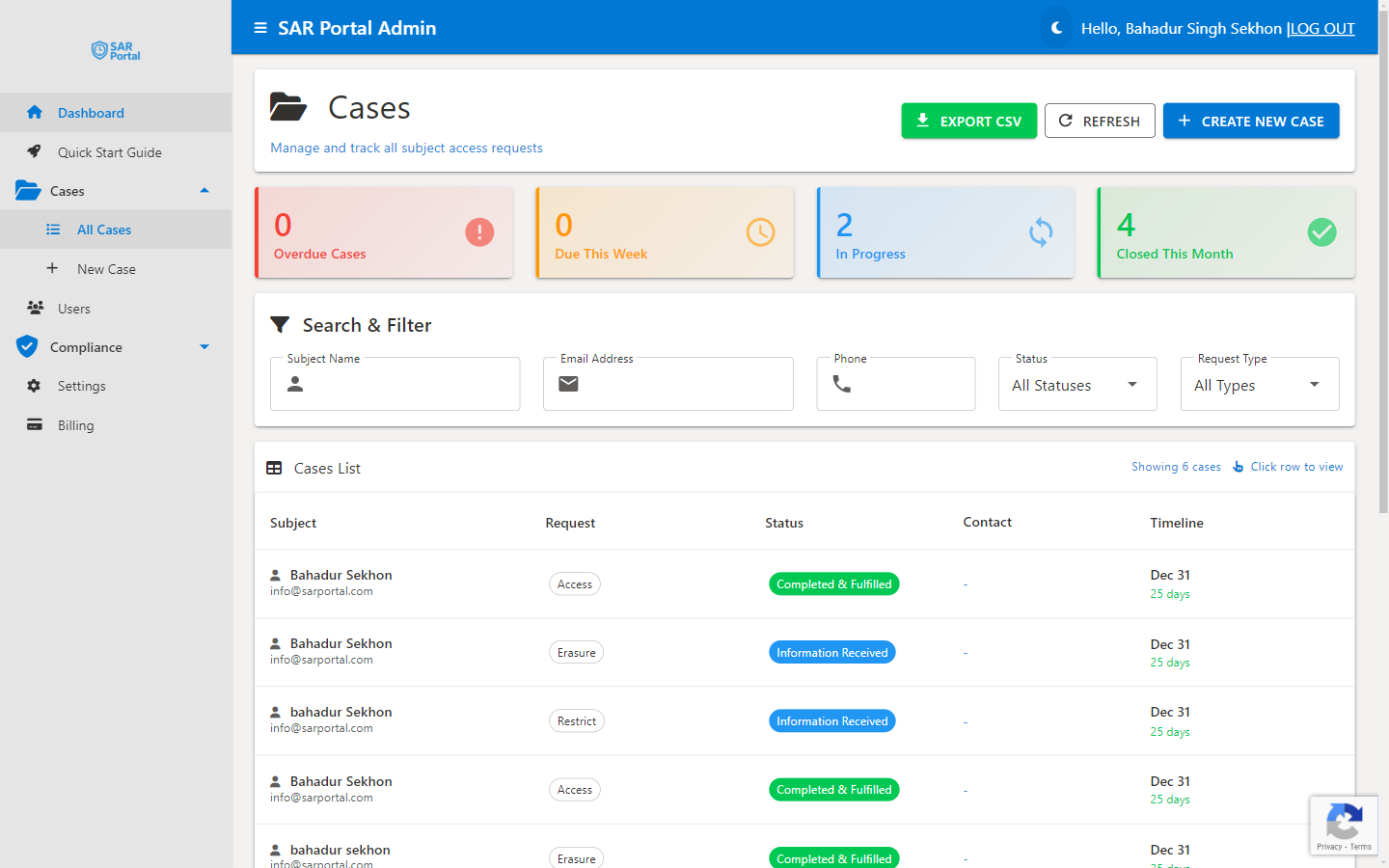
The Cases page shows all requests with key information.
Status Indicators
Color-coded cards at the top show:
- Overdue Cases (Red) - Past the deadline, requires immediate attention
- Due This Week (Yellow) - Approaching deadline
- In Progress (Blue) - Every case that is not closed, whatever its working status
- Closed This Month (Green) - Recently completed
- Ready to Close (Green) - Shown only when at least one open case has all of its Document Collation sources marked Ready to Send or Disposed
Search & Filter
Find cases quickly using:
- Subject Name
- Email Address
- Phone
- Status
- Request Type
Case List Columns
| Column | Description |
|---|---|
| Subject | The data subject’s name, with their email underneath. Hover over it to see the Case ID |
| Request | The request type, with a coloured dot when AI rated the case Medium or High risk (see below) |
| Status | The current status. Open cases that use Document Collation also show a readiness chip: Blocked, Ready, a count such as 2/3, or No Sources |
| Contact | The subject’s phone number (hidden on small screens) |
| Timeline | The due date and a days label such as “28 days”, “Tomorrow”, “Due today”, “3d overdue”, “Breached” or “Clock stopped” |
The newest cases (by date received) are listed first. Click a column heading to sort by it.
Case Actions
From the cases list, you can:
- Open a case - Click its row to open the full case page
- Export CSV - Download cases for reporting
- Refresh - Reload the list
- Create New Case - Start a manual case (Admins and Case Managers)
Admins and Case Managers can also record old, already-closed requests with Import Past Cases: see Importing Past Cases.
AI Risk Indicator
When your team creates a case on the Create Case page, AI scores its risk from 1 to 10. The score is read-only: you cannot set or change it. Use it as guidance, not as a control.
The score appears only on the Cases list, as a dot next to the request type:
| Dot | Score | Tooltip |
|---|---|---|
| Red | 7 or more | “High Risk - Score: n/10” |
| Amber | 4 to 6 | “Medium Risk - Score: n/10” |
| None | 1 to 3, or not scored | - |
Cases submitted through your public portal are not scored. The case page itself does not show a risk score; for AI help on a case, use AI Insights.
Understanding Due Dates
GDPR Article 12 requires response “without undue delay and in any event within one month.” SAR Portal automatically:
- Sets the due date to one calendar month after the Date Received you enter (today by default)
- Shows a days label on each case (e.g., “28 days”, “Tomorrow”, “Due today”, “3d overdue”)
- Highlights overdue cases in red
- Lists cases that are due soon or overdue on the dashboard
Extensions of up to 2 additional months are allowed for complex requests.
Next Steps
- Creating Cases - Learn how to create new cases
- Case Statuses - Understand the workflow states
- Case Actions - Available actions for processing
- Identity Verification - One-click Mark Verified and what gets recorded
- AI Insights - Next steps, completeness and disclosure checks on a case
- Case Warnings and Banners - What the alerts at the top of a case mean
- Importing Past Cases - Record historic, already-closed requests